Google’s commerce ecosystem is changing fast! Let me introduce you to Google's Universal Commerce Protocol (UCP) - an open-source standard designed to support the evolution of AI-driven shopping.
In this article, we’ll break down what Google’s Universal Commerce Protocol is, why it matters for advertisers, and how feed management fits into the picture. We’ll also explore best practices for adapting your product feed to UCP. This way you will stay compliant, reduce errors, and ensure your product advertising continues seamlessly as Google’s commerce infrastructure evolves.

What is Agentic Commerce?
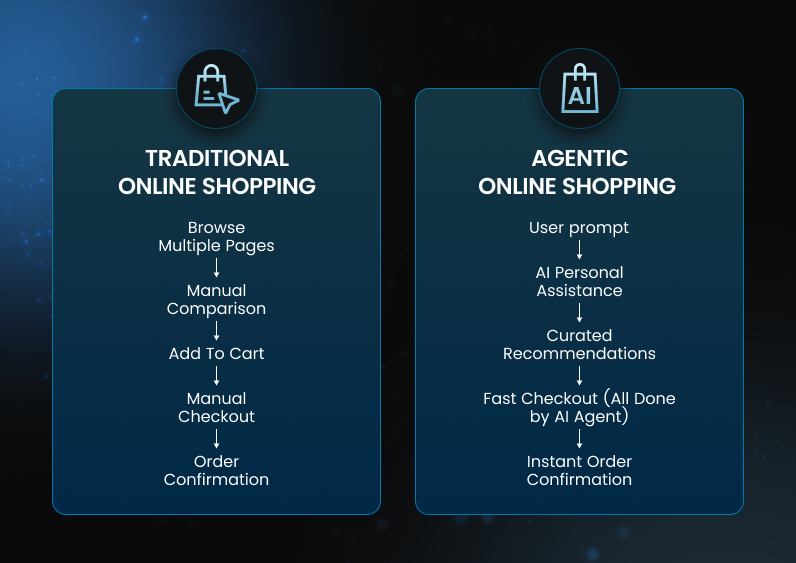
Agentic commerce is a new model of digital shopping in which AI agents act on a user’s behalf to complete end-to-end purchasing tasks. Instead of manually searching, comparing, and checking out, customers simply state their intent (such as product type, budget, or preferences) and the AI agent independently evaluates options, presents them, and executes the transaction once approved.
Today, there is a major shift in AI eCommerce from using chatbots to agents. The fundamental difference between these two is initiative. Bots respond to user inputs, while agents act proactively. Ecommerce agents function autonomously, accessing relevant business data as needed, and are capable of advanced reasoning, planning, and coordination with minimal human guidance.
What is Google’s UCP (Universal Commerce Protocol)
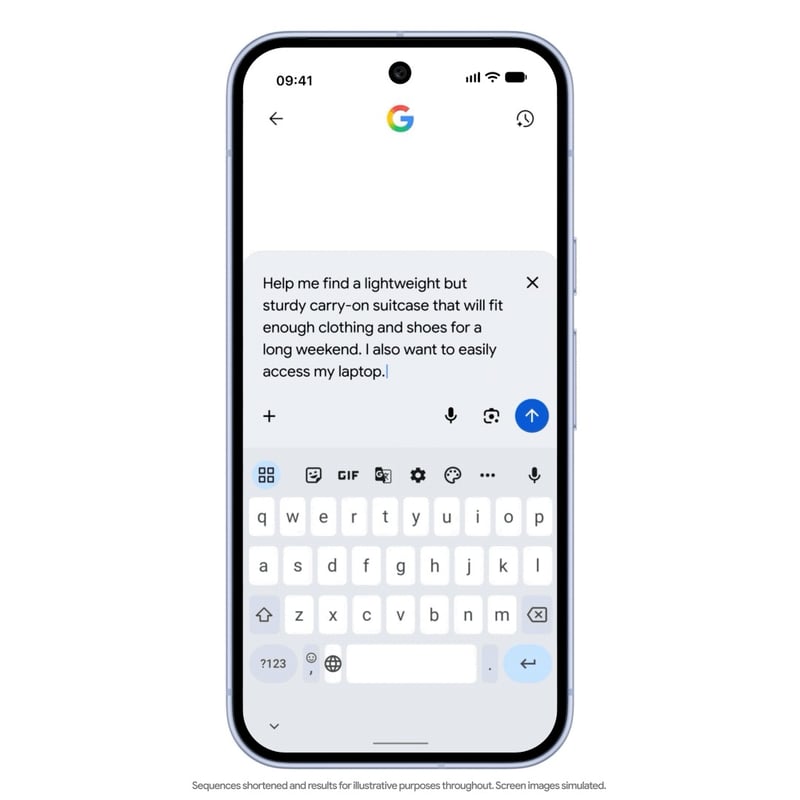
UCP, or Universal Commerce Protocol, is a new open standard for online shopping. It enables a new checkout experience that lets shoppers purchase from participating U.S. retailers directly during product discovery, without leaving Google.
UCP allows AI agents, apps, and merchants to communicate seamlessly, creating a unified language for eCommerce transactions, all the way from discovery to checkout, and without custom integrations for every store. It enables a smoother AI-powered shopping experience.
UCP is powered by Google Merchant Center product feeds.
Universal Commerce Protocol on Google
Google’s surfaces integrated with UCP
You can use UCP across Google-owned platforms such as Search AI Mode, the Gemini app, and Google Shopping.
Transactions are completed through Google Pay, with PayPal support planned to release soon.
The benefits of integrating with UCP for merchants & agencies
Integrating with UCP creates opportunities to capture high-intent demand, reduce checkout friction, and increase conversion rates in an increasingly automated marketplace. At the same time you maintain control over eligibility, compliance, and business rules.
- New sales channels – your products can be purchased in completely new ways, directly on Google’s surfaces such as Search AI Mode, the Gemini app, and Google Shopping.
- Easier customer reach – customers don't have to search for products themselves – the agent will do it for them. And the buying process can be done without leaving the app.
- Preserving relationships – you, as the seller, still decide whether to accept an order and provide customer service.
New required product attributes for UCP
To support UCP and enable AI-powered checkout experiences, you must adopt a new set of required product attributes within your product feeds. These attributes ensure that only eligible items are surfaced for automated purchasing, while also maintaining compliance with legal, safety, and business constraints.
You can find descriptions of new required feed attributes below.
1. Native_commerce - this attribute (eligibility flag) opts a product into the UCP checkout experience on Google.The native_commerce product attribute contains a single boolean. If this attribute is set to false or not provided, the product will not qualify for checkout.
2. Consumer_notice - this field is required for items with regulatory warning requirements. You are responsible for ensuring compliance with all relevant laws and warning requirements. When provided, these warnings are clearly displayed on the Checkout screen for consumers.There are two sub-attributes under the consumer_notice attribute group:
- consumer_notice_type: Must be one of three: legal_disclaimer, safety_warning, or prop_65.
- consumer_notice_message: This is a string - max 1000 characters. Three HTML tags are accepted: <b>, <br>, and <i>.

The following product categories of products are not eligible for checkout. Make sure the native_commerce attribute is either empty or set to false for these items.
- Financial products/ recurring billing (subscriptions, installments)
- Personalized goods and fulfillment options (personalized goods, non-new or final sale items, pre-order items, bundled services, special shipping, gifting, in-store activation)
- Policy and safety restrictions (age restricted, prohibited content, e.g.,alcohol, tobacco)
- Digital goods and services (services, rentals, virtual items, software dependencies)
- Final sale products
- Products that require special shipping

Where DataFeedWatch fits in the UCP model
Feed management is one of the few components in preparing your business for the Universal Commerce Protocol. You will definitely need API integration and will need to set up a few settings in your store, but how can feed management actually help?
You prepare and manage your UCP feed so that you can create rules for which of your products should be included or excluded in your UCP campaign. Some products are prohibited from being sold via AI. An optimized product feed allows you to sell only appropriate products.
We at DataFeedWatch are committed to be AI enablers. Our mission is to simplify and enhance the way companies manage and optimize their product feeds, enabling them to harness AI-driven tools and insights to achieve better results, faster. The next step is enabling our customers to sell with the help of AI agent.
How the introduction of UCP influences your feed
The presence of UCP in eCommerce means the emergence of a new sales channel with enormous sales potential. You need to focus your feed management effort on preparing for this opportunity to reach more customers.
You will need to meet new product feed requirements to enable UCP.
1. Eligibility Flag - you need to add your products to AI checkout. Set eligibility flag by adding native_commerce attribute to your feed.
2. Consumer Notices - make sure your products are compliant with legal warnings (Prop 65, safety)
3. Restriction Rules - create restrictions rules: exclude products that are not eligible for UCP (subscriptions, pre-orders, etc.).
To get started with UCP in the DataFeedWatch tool, create a new channel called Google Universal Commerce Protocol (UCP), where you will have an extra simple feed with only the attributes required by UCP.
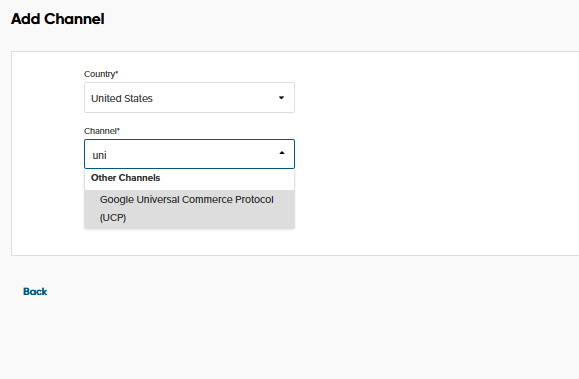
By adding a supplementary feed, you don't risk disrupting your existing campaigns, can freely activate or deactivate your UCP wherever you want, and can easily test your UCP campaigns.
A feed management tool like DataFeedWatch can’t implement UCP by itself, but it can significantly simplify and reduce the risk of a UCP implementation by helping to execute, validate, and adapt to a new channel, as well as help to include the right product in the campaign.
Best feed management practice for UCP
1. Use UCP-specific template
DataFeedWatch provides ready-made templates with required fields for each channel (e.g., ID, title, price, availability), helping you get your feed formatted correctly from the start.
2. Validate feeds automatically before uploading
Run automated feed checks to catch errors like missing attributes, incorrect GTINs, or disallowed values before you push to channels.
3. Optimize product titles, descriptions, and images
Well-optimized creatives improve visibility and performance. DataFeedWatch shows best-practice uses like prioritizing high-quality visuals or matching variant images to variant products.
4. Update feeds frequently
Don’t just update once a day — frequent refreshes ensure price and stock accuracy, and avoid showing out-of-stock items. DataFeedWatch supports scheduling up to 24 automated updates per day.
Read our full guide to Google Shopping ads
How to enable UCP in Google Merchant Center
Enabling UCP in Google Merchant Center is a simple process that allows your account to recognize and use the new protocol. Here are three things you need to do to get your products ready to be displayed for UCP.
1. Activate UCP on your eCommerce platform
If you’re a Shopify merchant, you should already see a setting that lets you turn on UCP. If your store is on a different platform, the best approach is to reach out to your platform provider to find out how to enable UCP.
Note: Before you start setting up Google Merchant Center, confirm that UCP is activated on your platform. This is an essential first step.
2. Optimize your data feed for UCP
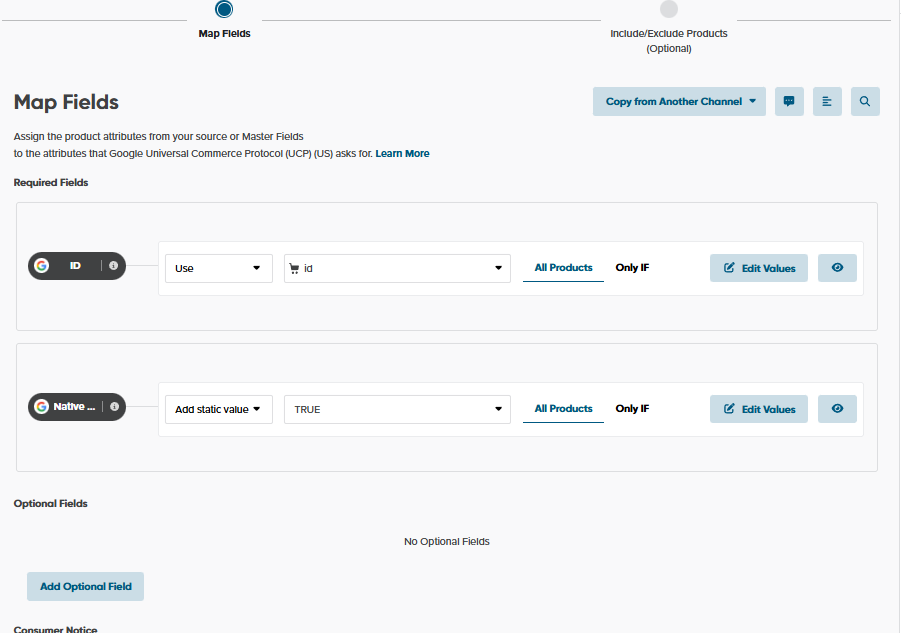
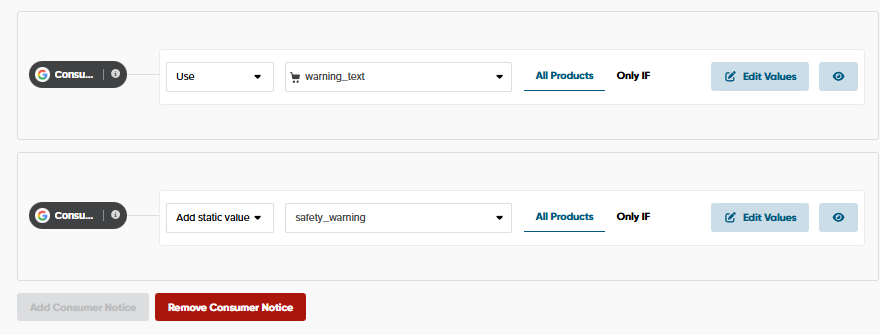
To be able to activate UCP in Google Merchant Center, you must include all the required attributes: native_commerce and consumer_notice (for regulated products) in your UCP feed. Using the DataFeedWatch tool, you will add them in a separate feed dedicated for this type of campaign.
.png)
3. Test if everything is correct in Google Merchant Center
Once you have an optimized UCP feed, you should check whether it’s working correctly in Google Merchant Center
- To push your latest feed changes, refresh your feed - Click the “Update” button
- Review your feed for errors or warnings
- Check the “Errors” and “Needs attention” sections - if both are clear, it means your new UCP attributes are already supported by Google Merchant Center.
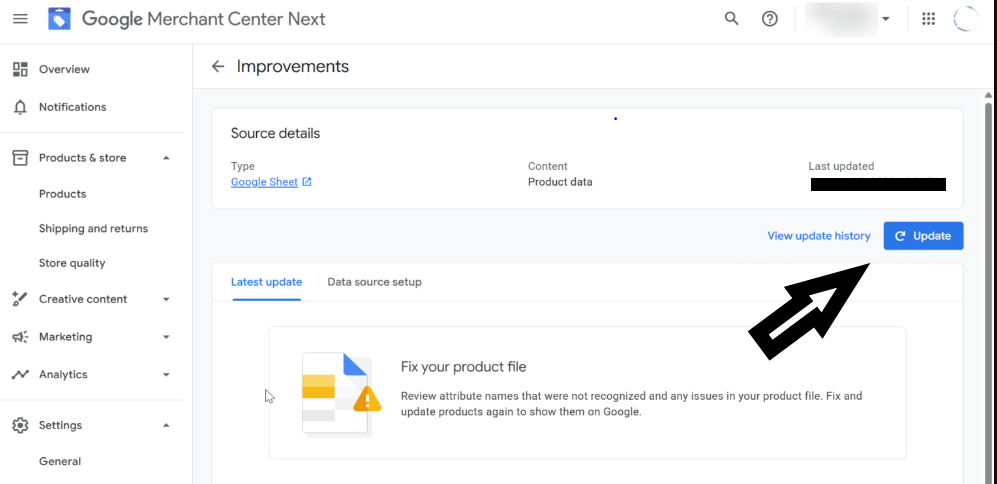 Google Merchant Center page
Summary
Google's introduction of the Universal Commerce Protocol is certainly exciting news for merchants and agencies. With little effort, you can start offering your products on a completely new and very promising channel. AI is here to stay, so eCommerce sellers must adapt to the rapidly evolving new reality, or they may soon find themselves out of place in eCommerce.
It turns out that even adapting your product feed to UCP requirements is not very difficult, especially when you use a feed tool. So let’s get started!
