
DataFeedWatch adds Metafield Translations and Metaobject Support, continuing our push to be the most complete feed management tool for Shopify merchants.
There’s a problem that quietly costs Shopify merchants every day.
You have product data in your store. Translated data. Structured, organised data that took real effort to set up. But Shopify stores certain types of data, translated metafield values and metaobject content, in a way that most feed tools have never been built to surface.
With DataFeedWatch's latest Shopify update, we’ve fixed that problem.
We're introducing support for Metafield Translations and Metaobjects, making it easier to send the rich product data you've already created directly to your advertising campaigns.
The challenge
Many Shopify merchants invest a lot of time improving their product data, only to discover that not all of it is available when building product feeds.
Raw metaobject data doesn’t arrive in a form a channel like Google Merchant Center can accept. What comes through is a long, unusable string of data rather than the clean value sitting in your Shopify admin. Channels only approve clean, mapped fields, not raw data dumps, so this kind of data gets rejected before it ever reaches a live product feed.
In practice, what this meant was:
- Translated product information wasn't reaching international campaigns, forcing merchants to duplicate or manually maintain translations.
- Metaobject data stayed inside Shopify, making structured information like materials, collections or other reusable product attributes unavailable in feeds.
- Extra manual work every time product information changed.
- Missed opportunities to enrich product listings with more relevant product data.
The information already existed inside Shopify, it just wasn't easy for feed tools to access.
What's new: translated values and structured data, both ready for feeds
DataFeedWatch now brings more of your Shopify product data directly into your feeds.
Metafield Translations
If you use translated metafields in Shopify, DataFeedWatch can now automatically pull the correct value for each language into your feed.
Instead of maintaining separate copies of translated content, you can use the translations you've already created in Shopify.
A few things worth knowing:
- This works for text-based metafields. Not all field types are supported for translation. Image-type metafields, for example, are not included.
- Each language pulls its own translated values independently.
- Metafield Translations works as a standalone setting. You do not need to enable anything else to use it.
Metaobject Support
DataFeedWatch now also supports Shopify Metaobjects by importing their Display Name into your feeds.
That means reusable product information you've already structured in Shopify can now be mapped just like any other feed attribute.
For example, you can use metaobject values in:
- Product titles
- Product descriptions
- Custom labels
- Other mapped feed attributes
Whether you've created reusable material information, collections, size guides or other structured data, it's now much easier to include it in your campaigns.
Even more powerful together
For merchants selling across multiple markets, these two features work hand in hand.
You can now combine translated product information with structured product data, helping ensure every market receives richer, more relevant product information from the same Shopify catalogue.
Combined with our existing Shopify Markets integration, which already supports market-specific pricing, currencies and availability, DataFeedWatch now gives Shopify merchants access to even more of the data they've already invested in creating.
Do you need to reconnect your Shopify account?
Some existing DataFeedWatch customers will need to reconnect their Shopify store before these features become available.
To check, simply open the Download Config screen inside DataFeedWatch. If your store requires reconnection, you'll see a prompt there.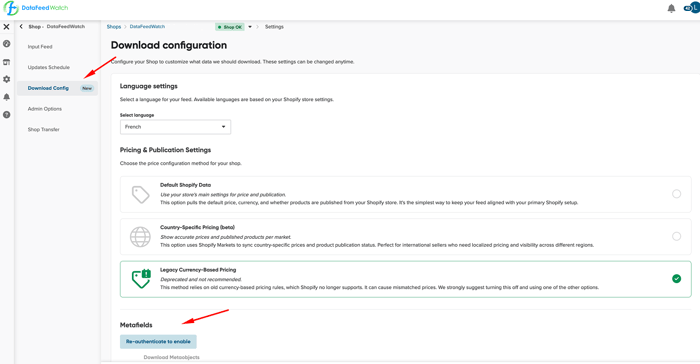 Enable both features in Shops > Shop Settings > Download Config
Why this matters
Better feeds start with better product data.
When your campaigns can access translated content and structured product information, it's easier to build richer product listings for every market without creating additional manual processes.
Most importantly, you no longer have to recreate information that already exists inside Shopify.
Now, your structured product data can finally reach your campaigns.
Get started
If you're already using DataFeedWatch, check your Shopify connection and start using Metafield Translations and Metaobject Support today.
New to DataFeedWatch? Start a free trial and discover how much more of your Shopify product data can power your product feeds.
This release is another step in our mission to make DataFeedWatch the most complete feed management solution for Shopify merchants.
